
My Tasks
The My Tasks page lets you manage all your geocoding jobs.
Accessing My Tasks
- Log in to your account
- Click My Tasks in the navigation
Task List
Your tasks are displayed with:
- File name - Original uploaded file
- Date - When the task was created
- Rows - Number of addresses
- Status - Current state of the task
Task Statuses
| Status | Meaning |
|---|---|
| Processing | Geocoding in progress |
| Ready | Complete, ready to download |
| Downloaded | You've downloaded the results |
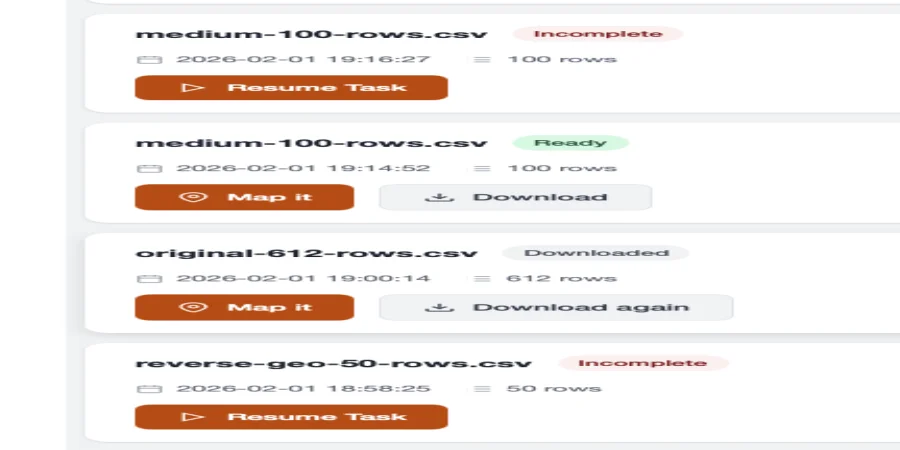
Actions
Resume a Task
If you started a task but didn't complete it:
- Find the task in your list
- Click to expand
- Click Resume
- Complete the column mapping
- Process
Download Results
For completed tasks:
- Click the task
- Click Download
- Choose format (CSV, Excel, GeoJSON)
View Map
For geocoded tasks:
- Click the task
- Click View Map
- Interactive map opens in new tab
Delete a Task
- Click the menu (⋮) on the task
- Select Delete
- Confirm deletion
WARNING
Deleted tasks cannot be recovered. Download your results before deleting.
Task History
Tasks are retained for 30 days. After that:
- Task metadata is deleted
- Results are no longer available
- Download your data before expiration