
Download Results
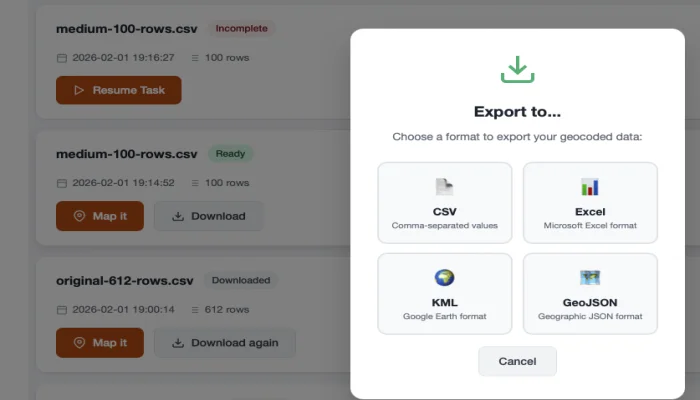
After geocoding is complete, you can download your results in multiple formats.
Available Formats
- CSV - Comma-separated values, compatible with Excel and most applications
- Excel (.xlsx) - Native Microsoft Excel format
- GeoJSON - For use with mapping applications and GIS software
What's Included
Your downloaded file will include:
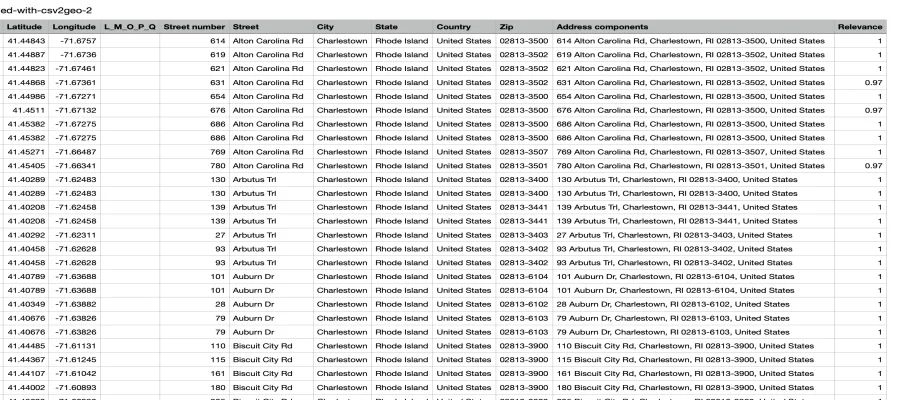
- All original columns from your uploaded file
- Latitude - The geocoded latitude coordinate
- Longitude - The geocoded longitude coordinate
- Formatted Address - The standardized address returned by the geocoder
- Relevance Score - Confidence level of the match (0-1)
How to Download
- Wait for processing to complete (progress bar reaches 100%)
- Click the Download button
- Select your preferred format
- The file will download to your computer
Understanding Results
Relevance Score
The relevance score indicates how confident the geocoder is about the match:
| Score | Meaning |
|---|---|
| 1.0 | Exact match |
| 0.8 - 0.99 | Very good match |
| 0.5 - 0.79 | Partial match |
| Below 0.5 | Low confidence |
WARNING
Review addresses with low relevance scores. They may need manual verification.
No Results
If an address couldn't be geocoded:
- Latitude and longitude will be empty
- Check the address for typos or missing information
Interactive Map
You can also view your results on an interactive map:
- Click View Map after processing
- See all your geocoded points on a map
- Click points to see details
- Share the map link with others
Next Steps
- Interactive Maps - Learn about map features
- Common Issues - Troubleshoot problems